
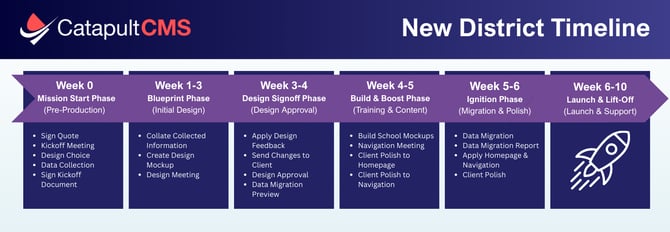
Below is a high-level overview of the updated project timeline and what you can expect at each phase. Timelines may vary depending on district size and project complexity, but this provides a general picture of how a website build typically progresses.
Week 0: Mission Start Phase (Pre-Production)
Weeks 1-3: Blueprint Phase (Initial Design)
Weeks 3-4: Design Signoff Phase (Design Approval)
Weeks 4-7: Build & Boost Phase (Training & Homepage Polish)
Weeks 7-8: Ignition Phase (Data Migration / Content Polish)
Weeks 9-12: Lift-off Phase (Post-Launch Support)
Week 0: Mission Start Phase
 The Mission Start Phase sets the foundation for your redesign. During this phase, you’ll provide key information about your site, select your design preferences, and review available features such as School Manager, Staff Directory, and Announcement tools. Once your design selection and required onboarding details are complete, your project officially moves forward.
IMPORTANT NOTE: A project cannot begin until a design is selected. Design selection is the trigger that allows the team to move into active production.
Weeks 1–3: Blueprint Phase
 This is where your new site begins to take shape. Using your selected design options, branding, images, colors, and logos, our team creates the initial homepage mockup and overall visual direction for your website.
At the end of this phase, we’ll meet with you for a design review to walk through the mockup, gather feedback, and confirm we’re aligned before moving forward.
NOTE: For districts with multiple sites, the initial design is created for the District (Primary) site first.
Weeks 3–4: Design Signoff Phase
 The Design Signoff Phase is where your district formally approves the visual design direction for the redesigned site.
Following the design review meeting, your team will have time to review the proposed design, discuss feedback internally, and share any requested refinements. During this phase, CatapultCMS works collaboratively with you to finalize the look and feel of the site before moving into the next step of the project.
At this stage, it’s important to understand the distinction between design decisions and content updates:
Design approval includes:
-
Colors and styling across desktop, tablet, and mobile
-
Banner height, font selections, and navigation styling
-
Layout and structural decisions, such as navigation placement
Content updates include:
-
Text, images, and page-level content
-
Information you can edit and update using the CMS at any time
Once your district confirms design approval, the design is considered finalized. CatapultCMS documents the approved styling and proceeds into the next phase of the project, including scheduling the Navigation Meeting and continuing the site build process.
NOTE: For districts with multiple sites, setup of school (secondary) sites begins after the district design has been approved.
Weeks 4-7: Build & Boost Phase

The Build & Boost Phase is a hands-on stage of the implementation process focused on training, navigation refinement, and content preparation. This phase helps ensure your team feels confident using the system and that key site elements are ready for the next step.
Training:
CMS training provides your team with the tools and knowledge needed to manage your website effectively. In the live, recorded “train-the-trainer” session, designated district representatives learn how to:
-
Edit and manage page content
-
Work with announcements and dashboards
-
Update School Manager and global content
-
Use core CMS tools and configurations
Additional, role-specific training may be scheduled as needed for editors with more focused responsibilities.
Topics covered include:
- Integrations (Including Google Calendar)
- General Editing Information
- The Dashboard
- Picture Elements
- Configuration
- File Management
TIP: Training sessions are recorded, allowing team members to review the material later or share it internally.
Navigation Meeting
Navigation plays a critical role in helping visitors find information quickly and easily. During the Navigation Meeting, you’ll work one-on-one with a Content and Design Specialist to review your site’s navigation structure, labels, and organization. Together, we’ll refine navigation to support clarity, usability, and alignment with your new design.
NOTE: Reorganizing your content is the very last step of the implementation process before you gain access to your sites, after the data migration is complete!
Homepage Polish:
After training, your team will begin refining homepage content and visual elements using the CMS tools. This is where you apply what you’ve learned and make the homepage feel complete and aligned with your district’s goals.
Common focus areas include:
- Banner Images/ Banner Cropping Tool
- Sync Your Google Calendar
- Update Your Banner
- Dashboards / Banner Boxes
The Build & Boost Phase gives your team time to learn, refine, and confirm key decisions so the project can continue forward with confidence and clarity.
Weeks 7-8: Ignition Phase

The Ignition Phase is where everything comes together. With your design finalized and your team trained, this phase focuses on preparing your site for launch by migrating content, polishing details, and completing final readiness checks. It’s a collaborative stage that ensures your site is accurate, accessible, and fully aligned before moving into launch.
Data Migration & Final Readiness
The Ignition Phase is where everything comes together. With design finalized and your team trained, this phase focuses on carefully transferring your content into the new site and getting everything launch-ready.
During data migration, CatapultCMS moves approved pages, files, and site data from your existing website (or provided sources) into the new platform. While we work to preserve structure wherever possible, some refinements are made to align your content with the new design system, templates, and accessibility standards.
What Happens During Data Migration
-
Approved pages and associated content are migrated into the new site
-
Template formatting is applied for a clean, consistent look
-
Image descriptions are added to support accessibility requirements
-
Light layout adjustments are made to improve usability and presentation
Important Notes
-
Data migration is a one-time process. Content added outside the approved migration set may not be included.
-
For districts with multiple sites, migration may be staggered to ensure quality and accuracy across all sites.
Data Migration Preview & Review
Before migration is finalized, you’ll receive a preview link and page map outlining exactly which pages and content are included. This preview becomes the official reference for what will be transferred.
Your team plays a key role during this step—carefully review the preview and confirm that all required pages are included. Any requested updates should be shared promptly to keep the project on track.
Important Note: Pages not included in the approved preview will not be migrated, making your review and confirmation essential.
Data Polish & Quality Review
Once migration is complete, CatapultCMS conducts detailed quality checks to ensure everything is accurate, consistent, and ready for launch. This includes reviewing:
-
Page formatting and layout consistency
-
Navigation behavior and usability
-
Accessibility considerations
-
Overall site presentation
At the same time, your team reviews the migrated content to confirm accuracy and completeness. This shared review period allows both teams to address final questions and make minor refinements before moving forward.
The Ignition Phase wraps up once both CatapultCMS and the district confirm the site is polished, complete, and ready to move confidently into Launch & Lift-Off 🚀
For full transparency, please review our Data Migration Disclosure to understand potential risks and considerations.
Week 8: Launch Phase
 Important Notes About Launch Day
Launch Day is an exciting milestone—this is when your new website officially prepares to go live! Our team carefully coordinates each step to ensure everything is polished, secure, and ready for a smooth rollout. Depending on your DNS settings, your site may go live the same day or shortly after.
Here’s what to expect as we move through launch:
Day 1:
- Final Approval Document: You’ll receive a launch approval document via PandaDoc. Your site cannot go live without this signed form, so completing it promptly helps keep launch on schedule.
Day 2:
-
Pre-Launch Quality Control: Our team performs a detailed review to confirm your site is fully ready for launch.
-
Hosting Setup: Once final approval is received, we configure hosting with your domain and publish the site.
-
DNS Setup: We’ll provide the IP address needed to point your DNS to our server.
Day 2 or 3:
-
DNS Propagation: After DNS updates, it may take anywhere from 5 minutes to 24 hours for your site to become visible to all users. Timing can vary depending on individual networks and providers.
-
SSL Setup: Once the site is live, we’ll immediately apply SSL (at no additional cost) to secure your website.
-
Post-Launch Quality Control: Our team completes a final review to ensure everything is functioning exactly as expected.
DNS: General Knowledge
The Domain Name System (DNS) connects your website’s domain name (for example, districtacronym.com) to the AWS server where CatapultCMS hosts your site. While we fully manage hosting, you remain in control of your domain name, which means a few DNS updates are required at launch time.
Don’t worry—we’ll guide you through each step.
Getting Your Site Live: General Process
1. Confirm Access to Your DNS Settings
To avoid launch-day delays, make sure you can access your domain provider account in advance.
-
Log in to your domain provider (such as GoDaddy or Network Solutions)
-
If you’re unsure who your provider is, search your domain on whois.domaintools.com
-
Locate or reset your login credentials ahead of time
Being prepared here helps ensure a smooth and timely launch.
2. Point Your DNS to Our IP Address
On launch day, we’ll provide the IP address for your site.
-
Update your DNS records to point your domain to the CatapultCMS hosting server
-
This step officially connects your domain to your new website
We’re happy to assist or review settings if needed.
3. Set Up Subdomains (If Applicable)
If your site includes subdomains (for example, schools.districtname.com), let us know before launch day so we can prepare everything in advance.
Planning ahead ensures all sites go live together without delays.
Specific DNS Recommendations
To ensure your website launches smoothly and is accessible to all users, please follow the DNS recommendations below. These settings help route traffic correctly to your new CatapultCMS-hosted site.
Point the Root and www to Our IP Address
-
Create A Records for both the root domain (e.g., districtname.com) and www that point to our hosting server’s IP address (provided on launch day).
-
Alternatively, you may use a CNAME record to point the root domain to www.
Include Subdomains (If Applicable)
-
If your district has multiple sites, subdomains such as schoolname.districtname.com can be configured at no additional cost, provided you control the main domain.
-
Share your list of subdomains with us ahead of launch so we can prepare everything in advance.
Confirm Internal and External DNS
-
Ensure that both internal and external DNS settings point to our provided IP address.
-
This helps prevent access issues for users on internal networks or behind district firewalls.
Weeks 9–12: Lift-Off Phase
 The final step in the Onboarding Process is the Lift-Off Phase! During the first month post-launch, you’ll continue to have direct access to the implementation team for questions and additional support as everyone begins exploring and using the new site.
NOTE: It’s completely normal for your team to identify adjustments or submit additional requests once they start interacting with the updated design. Our team is here to support you through this phase and ensure your site is performing smoothly as it gains momentum. 🚀