---
title: HTML Element
description: The HTML element (also known as Unrestricted Code), is used for placing raw HTML on the page. It is most commonly used to insert social media feeds onto a page. This article will go over how to fill o
---
[Skip to content](https://support.catapultcms.com/hc/en-us/articles/360049574491-html-element#main-content)
English
Show submenu for translations
[Submit a Ticket](https://support.catapultcms.com/kb-tickets/new?hsLang=en)
[](https://support.catapultcms.com/migration?hsLang=en)
Open main navigation
Close main navigation
- English
Show submenu for translations
- [Submit a Ticket](https://support.catapultcms.com/kb-tickets/new)
- [CatapultCMS.com](https://catapultcms.com/)
[CatapultCMS.com](https://catapultcms.com/)
Welcome to Catapult Support Knowledge Base!
- There are no suggestions because the search field is empty.
1. [CatapultCMS Help](https://support.catapultcms.com/?hsLang=en)
2. [CMS](https://support.catapultcms.com/cms?hsLang=en)
3. [Basic Elements](https://support.catapultcms.com/cms?hsLang=en#basic-elements)
# HTML Element
The HTML element (also known as Unrestricted Code), is used for placing raw HTML on the page. It is most commonly used to insert social media feeds onto a page. This article will go over how to fill out this element.
- With the Edit panel open, drag the HTML element to the page.
- Add a title (if you wish) in the CONTENT TITLE area.
- Write a description of the content in the DESCRIPTION area. This will not show up on the web, but it will show up in Catapult, so that you know what the HTML is for.
- Paste your HTML in the CODE area.
- Hit SAVE.
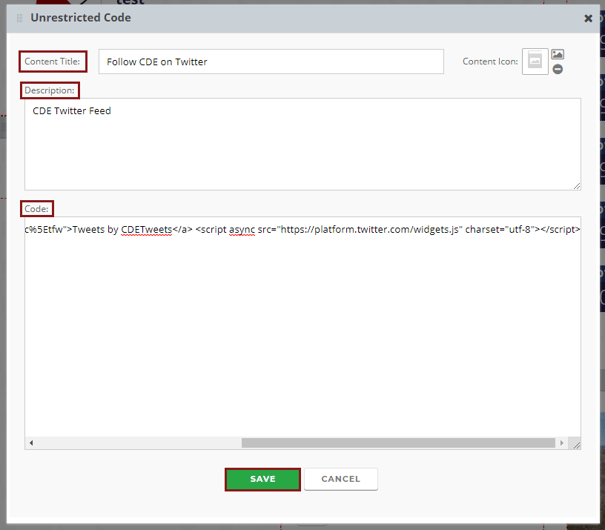
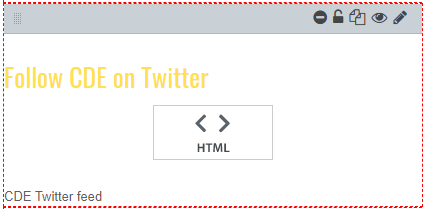
Here's how it looks in Catapult:
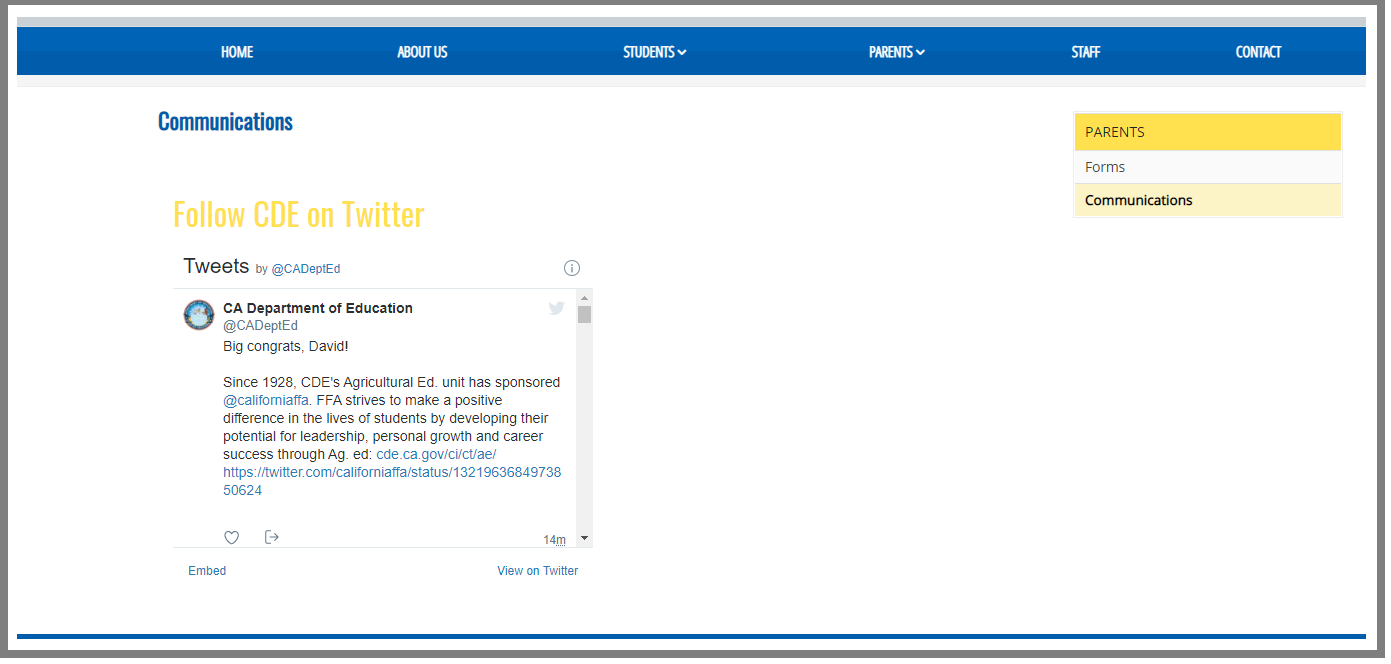
Here's how it displays on the web:
### Using AI-Generated Code
Many AI tools, such as ChatGPT, Claude, Gemini, and Microsoft Copilot, can generate HTML, CSS, and JavaScript. While these tools can be helpful, they often generate complete web pages or global styling that is not intended to be embedded within an existing website.
Improperly scoped AI-generated code can unintentionally affect other areas of your website, including page layouts, navigation, and styling.
For best practices and support expectations when using AI-generated code, please see our article:
[**Using AI-Generated Code in CatapultCMS**](https://support.catapultcms.com/using-ai-generated-code?hsLang=en)
- [CMS](https://support.catapultcms.com/cms?hsLang=en#main-content)
- [Getting Started with Catapult CMS](https://support.catapultcms.com/cms?hsLang=en#getting-started-with-catapult-cms)
- [The Dashboard](https://support.catapultcms.com/cms?hsLang=en#the-dashboard)
- [General Editing Information](https://support.catapultcms.com/cms?hsLang=en#general-editing-information)
- [Basic Elements](https://support.catapultcms.com/cms?hsLang=en#basic-elements)
- [Visual Elements](https://support.catapultcms.com/cms?hsLang=en#visual-elements)
- [File Management](https://support.catapultcms.com/cms?hsLang=en#file-management)
- [Integrations](https://support.catapultcms.com/cms?hsLang=en#integrations)
- [Compliance](https://support.catapultcms.com/cms?hsLang=en#compliance)
- [Configuration](https://support.catapultcms.com/cms?hsLang=en#configuration)
- [Implementation](https://support.catapultcms.com/cms?hsLang=en#implementation)
- [Connect](https://support.catapultcms.com/connect?hsLang=en#main-content)
- [Manage Users](https://support.catapultcms.com/connect?hsLang=en#manage-users)
- [SIS Configuration](https://support.catapultcms.com/connect?hsLang=en#sis-configuration)
- [Dashboard](https://support.catapultcms.com/connect?hsLang=en#dashboard)
- [Other](https://support.catapultcms.com/connect?hsLang=en#other)
- [Organization & Site Resources](https://support.catapultcms.com/connect?hsLang=en#organization-site-resources)
- [Messages](https://support.catapultcms.com/connect?hsLang=en#messages)
- [Emergency Resources](https://support.catapultcms.com/connect?hsLang=en#emergency-resources)
- [Implementation](https://support.catapultcms.com/connect?hsLang=en#implementation)
- [APP](https://support.catapultcms.com/app?hsLang=en#main-content)
- [App Management](https://support.catapultcms.com/app?hsLang=en#app-management)
- [What's New](https://support.catapultcms.com/whats-new?hsLang=en#main-content)
- [What's new at CatapultCMS](https://support.catapultcms.com/whats-new?hsLang=en#whats-new-at-catapultcms)
- [Contact Us](https://support.catapultcms.com/contact-us?hsLang=en)
- [Incident Report](https://support.catapultcms.com/incident-report?hsLang=en)
- [Implementation](https://support.catapultcms.com/implementation?hsLang=en#main-content)
- [Professional Add-On Services](https://support.catapultcms.com/implementation?hsLang=en#professional-add-on-services)
[](https://catapultcms.com/)
[CatapultCMS.com](https://catapultcms.com/)
[CMS Login](https://www.catapultcms.com/Login.aspx)
[CONNECT Login](https://www.catapult-connect.com/Account/Login?ReturnUrl=%2F)
Copyright © 2026, CatapultCMS